
Writing with AI
Your AI assistance dial: Tidy, Shape, Co-write, Direct
6 min read
Different writers want different things from an AI editor. Some want it to change almost nothing and just clean up the transcription. Some want a light line-edit. Some want a hand drafting a tricky beat. MakeVox puts that choice in your hands with a single dial with four settings, from the lightest touch to the most help. You set it per story, so a careful memoir and a fast first-draft novel can each have their own setting.
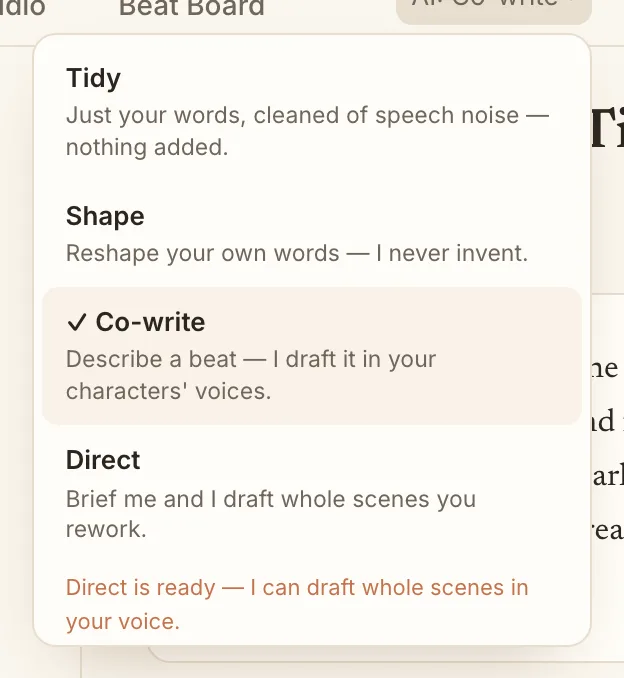
Tidy: just clean the transcription
Tidy is the lightest setting, the floor of the dial. It takes what you dictated and fixes only the mechanical noise of talking out loud, the false starts, the doubled words, the punctuation. It does not rephrase you or smooth your sentences. Every word stays yours. Reach for Tidy when you want a faithful transcript with the stumbles removed and nothing else touched.
Shape: your words, made clean
Shape is the default, and for good reason. It goes a step past Tidy: it takes your raw dictation and turns it into clean prose using only your words, giving your sentences a light line-edit without inventing sentences you did not say. The result reads like you on a good day, not like a machine wearing your name.
Tip. If you only ever use Shape, that is a feature, not a limitation. It is the setting that keeps your story most fully yours.
Co-write: describe a beat, get a draft
Co-write is for the moments you know what should happen but not how to say it. Describe the beat out loud, what changes, who feels what, where it lands, and the AI drafts that passage for you. You stay the author. You decide what to keep, rework, or throw away.
Direct: brief a whole scene
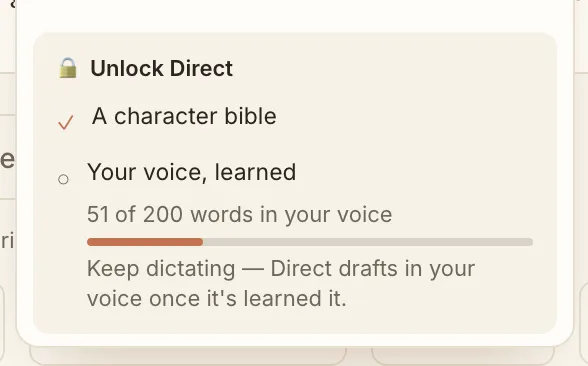
Direct is the power setting. You brief an entire scene, the way a writer might brief a collaborator, and the AI drafts it in your voice and your characters' voices. Because it is doing the most, Direct earns its way in. It unlocks once your story has enough for the AI to write like you: a character bible and a body of your own writing to learn your voice from.
What your Editor chat does at each setting
The Editor chat beside your manuscript follows the same dial, so what it will write depends on the setting your story is on.
- Tidy and Shape: the editor coaches. It points at what is working and what is not, and asks questions, but it does not draft prose. If you ask it to write a scene, it tells you the story is on Tidy or Shape and that Co-write or Direct turns drafting on.
- Co-write: describe a beat and the editor drafts that passage, in your voice and your characters' voices. For a whole scene, it tells you that Direct does that.
- Direct: ask it to draft or redraft a whole scene, for example "redraft the opening from my revised outline", and it writes the scene in your voice, from your outline, the section you have open, and your cast. If Direct is not unlocked yet, it tells you exactly what is missing: a character bible, or more of your own writing.
Draft this, the button in the Editor chat, drafts from what you have typed or said, grounded in your book: your outline (with the section you have open marked as the target), what is already written there, the text just before it, your Story Bible and your characters. The draft appears in the chat and in your review queue, and nothing goes into your manuscript until you accept it. The editor treats anything Draft this wrote as its own work, so you can ask it about the draft or ask it to rework it.
The editor reads your whole Story Bible, however long it is. A short bible goes in whole. A long one is read by chapter: the editor always sees the bible's list of sections and its opening, and it reads in full the chapter you have open and any chapter, section or name you mention. Ask about chapter 9 and it reads chapter 9. You never need to paste your bible into the chat. Chat messages can be up to 12,000 characters, so you can paste a scene to talk about.
How to switch
- Open a story and find the assistance dial in the workspace header (it shows the current mode, like AI: Shape).
- Click it to open the menu of Tidy, Shape, Co-write, and Direct.
- Pick a mode. The change saves to that story right away.
- If Direct is locked, the menu shows a short checklist of what is left to unlock it.
Why Shape is the default
MakeVox starts every story in Shape on purpose. The promise of the app is your voice, not a generated imitation of it. Shape gives you clean, readable prose in your own words from the first line, and you reach for more help only when you actually want it. If even a light line-edit is more than you want, drop the dial one notch to Tidy and the AI will only clean the transcription.
Keep reading
Your words, scored: Voice-Fidelity and the Provenance X-ray
See how much of a passage is yours. The Voice-Fidelity meter scores it, the Provenance X-ray shows it line by line, and a toggle keeps it your words only.
Writing with AIBuild your character bible
Your character bible is the AI's memory of who your people are. Write it or dictate it, and together with your prose it unlocks the Direct setting.