
Sharing & export
Design your book cover for print and ebook
4 min read
When your book is ready to publish, the book cover designer makes both covers you need: the full printed cover (back, spine and front on one sheet) and the front cover for the ebook. Find it in Studio, under Cover & style, below your cover art. Export also has a Print and ebook cover row that takes you there. It is for books; scripts don't have it.
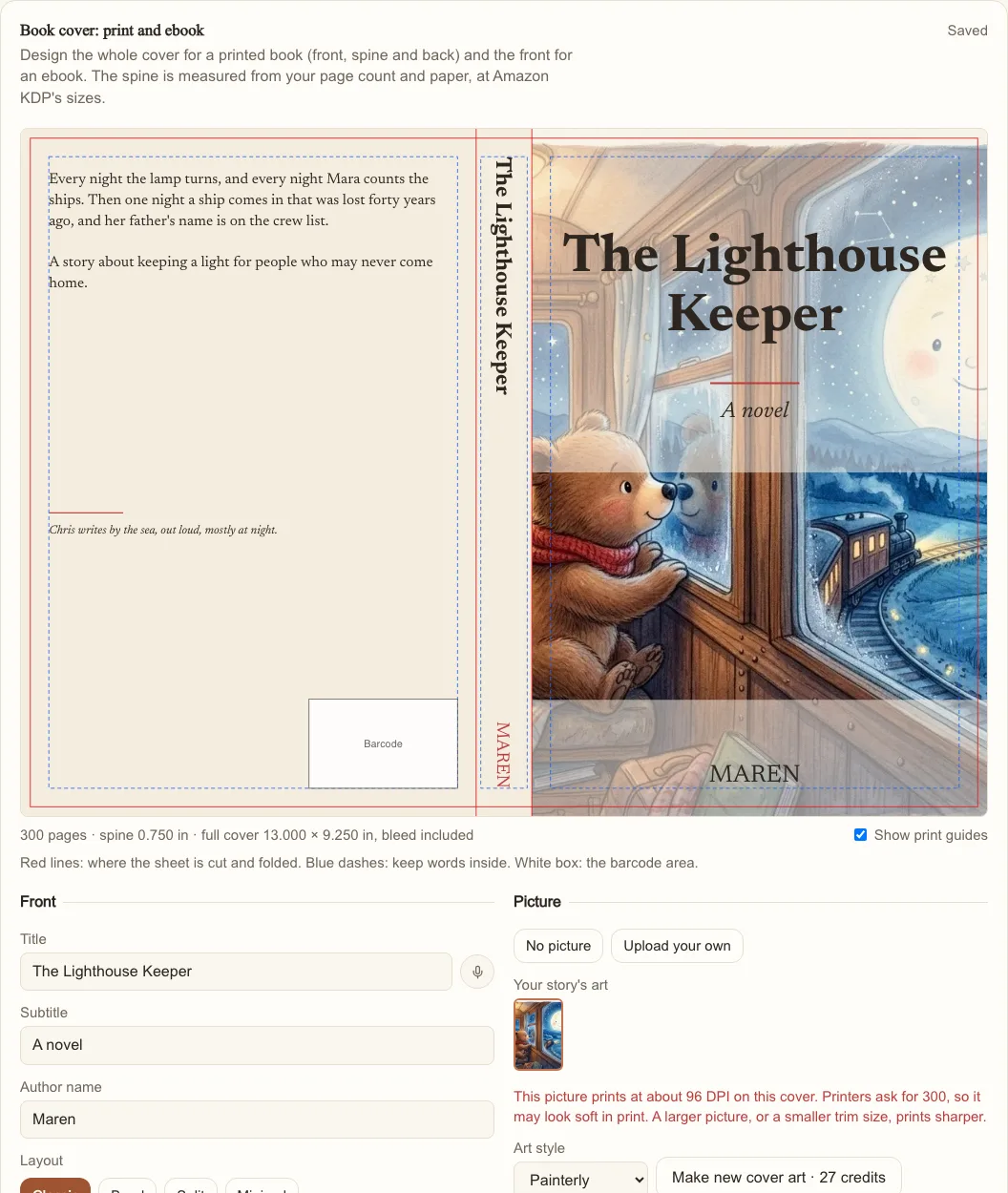
The front
- Title, subtitle and author name. The title starts as your story's title and the author as your first name.
- A picture: one of your story's covers or page illustrations, a picture of your own (Upload your own), or no picture.
- A layout: Classic (the picture fills the cover, with the type over it), Band (the title on a band across the middle), Split (the picture on top, the type below) or Minimal (a framed picture and the type set low).
- A typeface (Literary, Classic, Modern or Typewriter) and a set of colors.
MakeVox sets the words itself, so they are always crisp and spelled right. They are never painted into the picture.
The back
Write the back-cover blurb and a line or two about the author, or say them with the microphone. The lower corner by the spine stays clear: that is where KDP prints your ISBN barcode. If there are too many words for the space, the designer says so before you download, and suggests a shorter text or a bigger size.
The spine and the print size
- Choose the trim size (5 × 8, 5.25 × 8, 5.5 × 8.5, 6 × 9, 7 × 10, 8.5 × 8.5 or 8.5 × 11 inches).
- Choose the paper and ink: black ink on white or cream paper, or standard or premium color.
- Enter your page count. Until you do, the designer estimates it from the words in your story. For an exact spine, use the page count of your finished interior file.
- Check the size under the preview. It shows the spine width and the full cover's size, bleed included. A 300-page 6 × 9 book on cream paper has a 0.75 inch spine and a 13 × 9.25 inch cover.
The spine width is the page count times the paper's thickness, the same rule KDP's cover calculator uses. Title and author go on the spine once the book has at least 80 pages; KDP doesn't allow spine text on thinner books. Each paper has a page range KDP prints (black ink 24 to 828 pages, standard color 72 to 600), and the designer tells you if your count is outside it.
Tip. Turn on Show print guides to see where the sheet is cut and folded (red), where to keep words (blue dashes) and the barcode area (white box).
Download your covers
- Download print cover (PDF): one sheet with back, spine and front, 0.125 inch of bleed on the outside edges and the fonts embedded. Upload it as your KDP paperback cover.
- Download ebook cover: the front alone as a JPEG, at 1600 × 2560 pixels for Kindle or 1600 × 2400 for Apple Books.
Downloading costs nothing. If your picture is small for the print size, the designer shows how many DPI it will print at; printers ask for 300. A larger picture, or a smaller trim size, prints sharper.
New cover art
On the Standard and Pro plans, Make new cover art draws a fresh picture from your title, subtitle and the art style you choose. The button shows its price in credits, and you confirm before anything is charged. The new picture is added to your story's covers and used on this design. Pictures you upload stay on your device; MakeVox uses one only to build your PDF and doesn't keep it, so choose it again if you come back on another day.
Tip. Your design saves as you work. The cover fonts print Latin letters, accents and the usual punctuation. If a title uses other characters, the designer lists them so you can change them before you download.
Keep reading
Export your story
When you are ready to share, export your story to EPUB, DOCX, or PDF. Your writing is yours to take anywhere.
VisualsGenerate images for your book
Describe the picture you want and MakeVox generates it: an illustration for a section, or cover art for the whole book.
Sharing & exportYour pitch pack
Everything you send out with your work: your logline and notes on it, a pitch written from your pages, a printable one-sheet, and copy to share it.