
Sharing & export
Export your story
2 min read
Your story does not live trapped in MakeVox. When you are ready to share it, send it to an editor, or move it into another tool, you can export your writing in the format you need.
Choose a format
- EPUB, for e-readers and publishing platforms.
- DOCX, for Word, Google Docs, and most editors.
- PDF, for a fixed, print-ready or share-ready document.
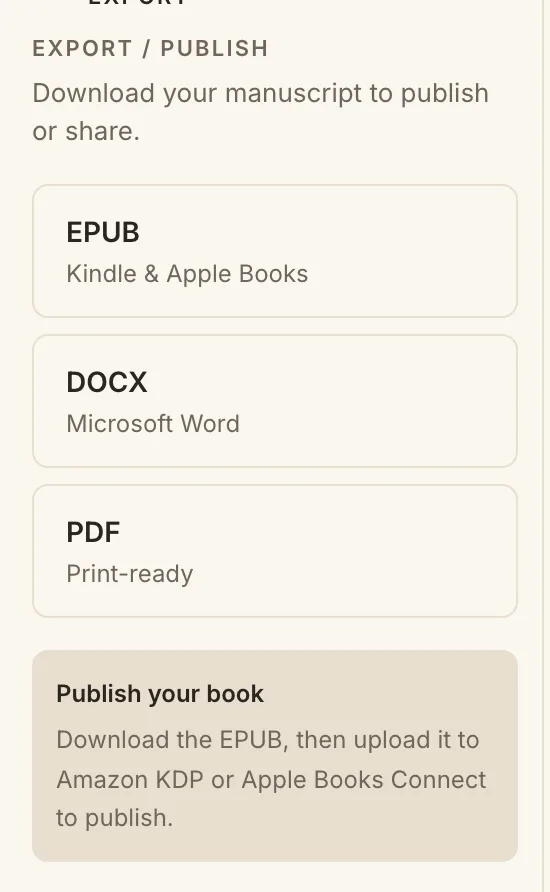
How to export
- Open the story you want to export.
- Find the export option in the workspace.
- Choose EPUB, DOCX, or PDF.
- Download your file and take it wherever you need it.
Publishing a printed book or an ebook? The book cover designer makes its cover: the full print cover as a PDF and the ebook front as a JPEG, at KDP's sizes. Export has a Print and ebook cover row that opens it.
Tip. Export as often as you like. It is a copy of your current draft, so your work in MakeVox stays exactly where it is.
Keep reading
Design your book cover for print and ebook
Design a printed book's whole cover (front, spine and back) at Amazon KDP's sizes as a print-ready PDF, and its front as an ebook cover.
Getting startedGetting started: your first chapter
Open MakeVox and type, or hit record and talk. Your AI editor shapes the rough draft into clean pages, and your outline grows as you go.
Writing with AIYour words, scored: Voice-Fidelity and the Provenance X-ray
See how much of a passage is yours. The Voice-Fidelity meter scores it, the Provenance X-ray shows it line by line, and a toggle keeps it your words only.